
Brisk — September 2026
Hey there, Brisk friends!
September was a big month for Brisk. Contracts is now in the product for everyone, we kept polishing invoices and the dashboard, and we are already deep into the next piece freelancers asked for: Time Tracker.
A huge thank you to everyone who shared feedback and helped us decide what to improve. Your input helps shape what we build.
Features-
Contracts (beta for all): Open Contracts in the sidebar (look for the BETA badge). Create and send contracts from Brisk the same place you already invoice.
-
Start from a Service Agreement template, or upload your own contract and edit it in Brisk.
-
Walk a guided draft wizard (parties and scope, then terms, then review and send), with rich text editing, attachments, and optional deposits (including auto creating a deposit invoice).
-
Sign by typing, drawing, or uploading an image, then send a client review link. Statuses stay clear: Draft, Sent, Viewed, Accepted, Canceled.
-
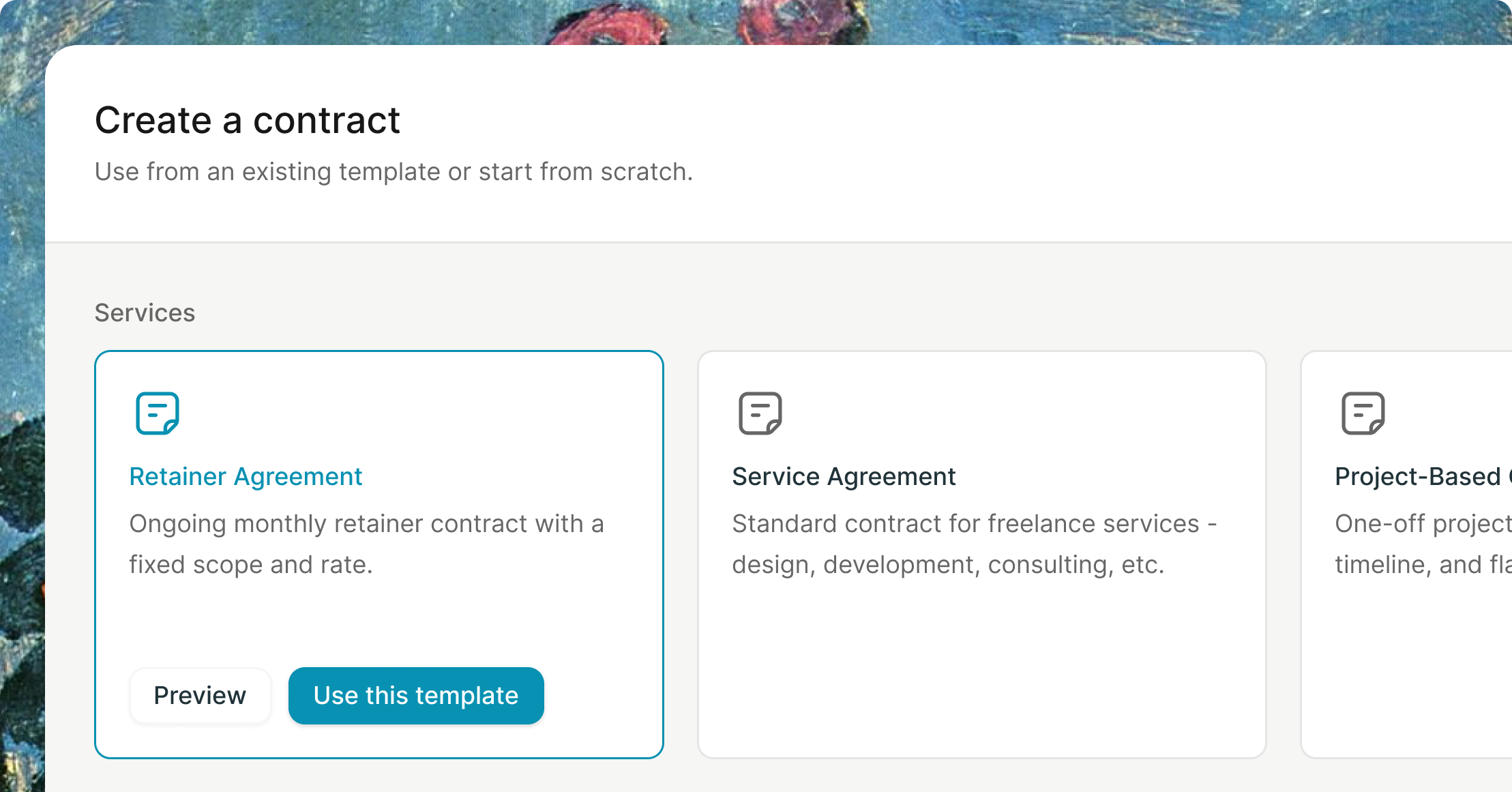
Retainer, NDA, and Subcontractor templates show as Coming soon in the create dialog. We are honest about what is ready today.
-
-
Time Tracker (in progress): We are actively building Time Tracker so you can capture hours and turn them into invoices later without retyping line items. It is not live in production yet. You will hear from us when it is ready to try. No ship date to promise; we are focused on getting the day to day flow right for freelancers.
-
PDF downloads: Invoice PDF filenames are shorter and clearer: invoice number plus your company name.
-
Public contracts: Client facing contract pages now carry branding and client email more reliably for the review experience
Contracts is the headline, but September was also about quieter reliability: invoices, PDFs, and the dashboard you open every day.
Time Tracker is next on the workbench; we will share it when it is ready, not before.
Open Contracts in your sidebar, try a Service Agreement or an upload, and tell us what feels off. Every note shapes what we ship next.
Thanks for being part of our community and helping us build a better way to work.
Contracts are here 😀 beta access
Hey there, Brisk friends!
Back in June, we teased Contracts. Today, it’s available in Brisk as a beta :)
You asked for one place to agree on scope, get a signature, and keep billing in the same workflow as your invoices. This first version supports real client work, with more templates on the way.
Find Contracts in the sidebar, marked with a BETA badge.
What’s in the beta-
Find Contracts in the sidebar alongside your dashboard tools.
-
Start with the Service Agreement template for freelance services, including design, development, and consulting, or upload your own contract.
-
Use the guided setup to add the parties and scope, then set compensation, payment, duration, and ownership terms.
-
Edit your contract with headings, formatting, lists, and tables. Your draft saves automatically.
-
Add supporting files, such as a statement of work.
-
Optionally request a deposit as a percentage or fixed amount, and create a deposit invoice when needed.
-
Sign by typing, drawing, or uploading an image, then send the contract to your client.
-
Your client receives an email with a secure link to review and accept the contract.
-
Track Draft, Sent, Viewed, Accepted, and Canceled statuses in the contract list or detail view.
-
Open and review contracts on your phone or desktop.
These templates appear in the create dialog with a Coming soon badge:
-
Retainer Agreement
-
Non Disclosure Agreement (NDA)
-
Subcontractor Agreement
-
Open Contracts from the sidebar in your Brisk dashboard.
-
Choose the Service Agreement template or upload your own contract.
-
Add the details, review the document, sign it, and send it to your client.
Contracts is ready for real client work, but it’s still early. We’ll keep refining the experience and adding templates. If something fails or feels awkward, tell us. That’s what this beta is for.
Ready to try it? Open Contracts in your dashboard and send your first one.
Thanks for being part of our community and helping us build a better way to work.
Balint Bogdan
Brisk — August 2026
Hey there, Brisk friends!
August was a busy month here at Brisk. We're working a lot on Contracts to get it on soon and also worked on the tools you use to manage invoices, payments, and onboarding. Here’s what’s new.
A huge thank you to everyone who shared feedback and helped us decide what to improve. Your input helps shape what we build.
Features-
Invoice activity: Activity now records when a client views an invoice. We also polished the branding preview.
-
Mark invoices as paid: You can mark an invoice as paid from its details.
-
Onboarding: The post-signup first-use dialog and onboarding flow have been refreshed.
-
Invoices grid: You can select multiple invoices on the dashboard, and client cells are clearer.
-
Dashboard: We unified padding and polished key dashboard screens.
-
Client payments: Checkout, settings cards, and empty states have been updated.
-
Invoice details: We made requested fixes to the invoice details page.
-
Client editing: We fixed the client details editing flow and project persistence.
-
Recurring invoices: We fixed the recurring invoice table styling.
-
Invoices: We fixed several invoice UI inconsistencies.
-
Dashboard: We fixed a responsive layout issue.
-
Dropdown: We fixed a dropdown issue in onboarding.
-
Onboarding: Business name validation now works during onboarding.
Alongside the bigger updates, we polished parts of the dashboard and fixed issues across invoices and onboarding.
Ready to see what’s new? Open your Brisk dashboard to try the updates, and thanks for being part of our community and helping us build a better way to work
Brisk — July 2026
-
Invoice detail drawer. Open an invoice in a side drawer, then move between invoices using row navigation.
-
Celebration moments. See confetti when you send an invoice or mark it as paid. Reduced motion settings are respected.
-
Payment methods in Settings. Manage payment methods directly from Settings.
-
Reminder tone templates. Choose a tone for invoice reminders.
-
Invoice sending. Review a clearer confirmation after sending, a polished preview, and sidebar refinements.
-
Animated modals and sheets. Dashboard and payment dialogs now use consistent animations.
-
Bank details. Validation now adapts to the selected country, and the dialog has been refined.
-
Invoice drawer. Use drawer actions while timeline data loads, without waiting for a blocking spinner.
- Error message. The unwanted error message no longer appears in the interface.
Ready to see what’s new? Open your Brisk dashboard to try the updates, and thanks for being part of our community and helping us build a better way to work
Brisk — June 2026 (first changelog)
June has been a whirlwind of a month here at Brisk! We spent a lot of time chatting with you about the hurdles you face while managing your freelance business. You told us where things felt repetitive or clunky, and we listened. From quicker invoice creation to more ways to get paid, these updates are all about giving you your time back.
A huge thank you to everyone who shared their feedback: most of what you see below was built specifically because you asked for it!
📋 Reuse your most common servicesStop typing the same descriptions over and over. You can now save your go-to services and pop them into any invoice with a single click.
-
Save time: Draft invoices in seconds, not minutes.
-
Stay consistent: Keep your pricing and descriptions uniform across all clients.
-
Perfect for regulars: Ideal if you offer set packages or hourly rates.
Make it as easy as possible for your clients to say "paid." By connecting your Stripe account, you can now accept secure card payments directly on your invoices.
-
Get paid faster: No more waiting for bank transfers to clear.
-
Zero admin: Brisk automatically marks the invoice as "Paid" the moment the transaction clears.
-
Professional experience: Offer your clients the modern checkout experience they expect.
Managing international clients shouldn't be a headache. You can now add multiple, custom payment instructions to every invoice.
-
Work globally: Add local bank details, routing numbers, or PIX keys for different regions.
-
Your way: Include direct payment links or specific wire instructions.
-
Clarity for clients: Eliminate the back-and-forth emails asking "How do I pay this?"
If you have ongoing retainer work, this one is for you. Create an invoice once, set the schedule, and let Brisk handle the rest.
-
Hands-off billing: Brisk generates the next invoice automatically based on your frequency.
-
Never miss a bill: Stop worrying about remembering to send that monthly invoice on the 1st.
Sometimes an invoice needs a little extra context. Now you can attach files directly to your invoices so your clients have everything they need in one place.
-
Full transparency: Attach timesheets, expense receipts, or project reports.
-
Fewer hurdles: Give your client’s finance team all the proof they need to approve your payment instantly.
We’re currently heads-down building Contracts. Soon, Brisk will be your all-in-one shop to define your project scope, sign terms, and send invoices without jumping between three different apps. Stay tuned!
💖 Final wordsBeyond the big features, we’ve polished up the dashboard and squashed a few bugs to make your experience even smoother. Every one of these changes helps turn Brisk into a more complete home for your freelance work.
Ready to see what’s new? Open your Brisk dashboard and take these features for a spin!
Thank you for being part of our community and helping us build a better way to work.
The User Interview Edition

A month ago, I sat down with 24 of you for one-on-one user interviews. This changelog is the direct result of those conversations. Where a feature or fix traces back to a specific piece of feedback, I’ve included the name of the person who sparked it—because that’s how building software should work.
✨ The Big Stuff-
Reusable Services: You can now save your most common line items and pop them into any invoice in seconds. Francesco mentioned that picking services from a list would be "perfect for what I need" back when this was just a sketch; now it’s ready for everyone.
-
A Better Demo flow: You can now try the full Brisk experience without needing to create a "real" invoice first. Jakub pointed out that the demo felt hidden, so we’ve overhauled the visibility, fixed the totals, and polished the dashboard. (Fun fact: one designer I interviewed liked the demo so much they sent me a real invoice mid-call. I paid it.)
-
Global Feedback tab: Good ideas don't always happen when you're looking at a settings page. You can now send me feedback with one click from anywhere in the app.
-
The Invoice Detail Drawer: Click any sent invoice and a side drawer slides out to show you the status, amount, and activity timeline at a glance. You can mark as paid, send reminders, or download PDFs right there. Georgia was tracking overdue invoices with red dots on a physical whiteboard, and Edmond told me he’d often stare at his spreadsheet wondering "Wait, is this one paid?" This drawer is for both of you.
-
Smart Due Dates: Due dates now behave correctly when you change the issue date, including "Due on receipt" logic.
-
Polished Currency Support: The currency dropdown no longer goes blank when pre-selected, and PLN is officially in. Jakub caught this during onboarding, and he was right—it was confusing.
-
Flexible Emailing: You can now edit the recipient’s email address right before sending. Jakub assumed the email template was locked; it isn't anymore.
-
Better PDF Access: PDF exports are now clearly visible in the demo flow. Kate needs PDFs for clients who use Airtable, and Georgia downloads one for every record. Heard and fixed.
-
Improved Send Flow: Improved the send flow with dedicated Compose and Preview tabs, plus a visible reminder schedule so you know exactly what will happen after you hit send.
-
Quantity & Price Fixes: Decimal values are now preserved in the service price stepper and reusable service price inputs.
-
Customizable Tones: Reminder emails now come in three flavors—Gentle, Firm, and Urgent. Each has unique subject lines and copy you can tweak. Saad saw the early version of this in October and knew exactly why it mattered: finally, the awkward follow-up is automated.
-
Clearer Templates: The edit-reminder dialog is now much more intuitive. Julien flagged that it wasn't clear how to use template variables, so we made them obvious.
-
Reminder UI: Refined the reminder UI across mobile sheets and invoice email flows.
-
Multi-Bank Support: You can now add multiple bank accounts. Jakub invoices through a Polish account and a Wise account depending on the client; now the app supports that setup perfectly.
-
International Transfers: Bank transfer instructions are now country-aware. We added missing international fields like Beneficiary Address and Account Type that a designer pointed out during our calls.
-
Stripe Improvements: Fixed the redirect flow so you land back on the Payment tab after onboarding, and cleaned up the UI to prevent duplicate API requests.
-
Freelance-Friendly: The "Company Name" field is now optional. Kate pointed out that not every freelancer runs under a formal company name, and the app shouldn't force you to pretend otherwise.
-
Streamlined Setup: We removed the extra "Add client details" step in onboarding. Francesco, Julien, and Jakub all stumbled on this same screen. Three people tripping on the same step isn't a coincidence—it was a design mistake of mine. It’s gone now.
-
Smarter Defaults: New clients now default to your company's country, and your home country carries through from onboarding automatically.
-
Silky Smooth Transitions: We’ve updated over 150 files to add shared motion tokens. Dialogs, mobile sheets, and buttons now feel more responsive and fluid.
-
Logo Handling: If you haven't uploaded a logo, we’ll show your initials. If you use a transparent logo, it now renders perfectly against the background.
-
Accessibility: Added support for reduced-motion settings and refined our loading spinners.
-
Security Upgrade: Fixed a request forgery vulnerability on public invoice pages.
-
Stability: Various build and compile fixes to keep the app running fast.
In short: Most of this list exists because freelancers gave me half an hour of their time to tell me the truth. Dilan, Bianca, Haseeb, Georgia, Caroline, Jakub, Julien, Bhuvanesh, Abdul Rehman, Francesco, Kate, Panagiotis, Patrick, Sobia, Alessandro: thank you. This is what happened to everything you said.
— Balint
Reusable Services are here! 🚀
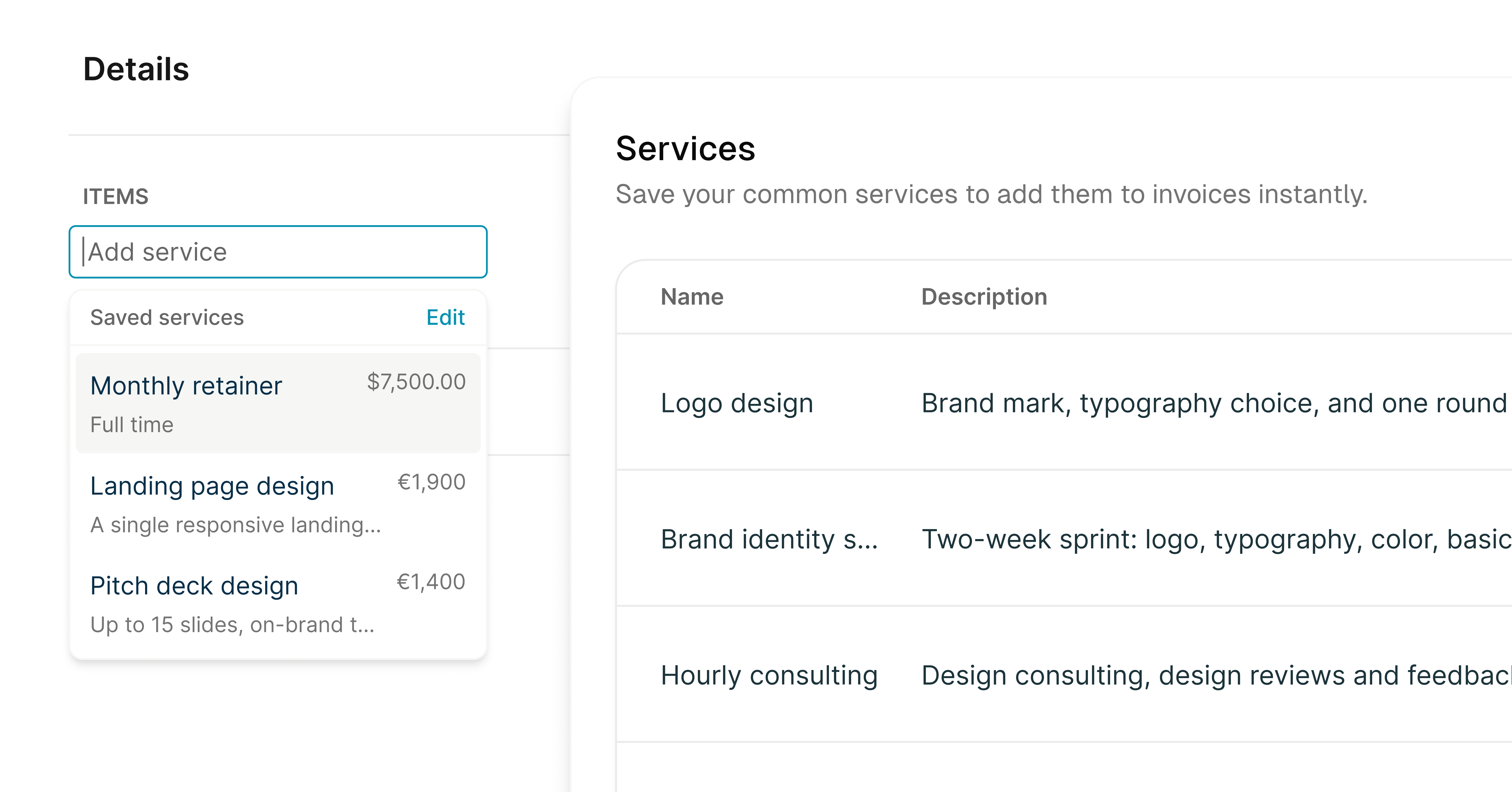
Let’s be honest: nobody becomes a freelancer because they love data entry. If you find yourself typing "Product Design" or "Hourly Consulting" for the hundredth time this month, we’ve got some good news for you.
We’ve just launched Reusable Services. Instead of starting from scratch every time you bill a client, you can now save your most common tasks and drop them into any invoice with just a couple of clicks. It’s all about getting the boring stuff out of the way so you can get back to the work that actually matters.
What’s new?-
Save it once: Store your standard rates, descriptions, and services in your library.
-
One-click invoicing: Pull your saved services directly into a new invoice instantly.
-
Total flexibility: Everything is still editable. Need to tweak a price or adjust a description for a specific client? No problem.
-
Less room for error: Since the details are pre-filled, you don’t have to worry about typos in your pricing.
Alongside this update, we’ve polished the invoice editor to make it feel a bit snappier and fixed a few tiny layout bugs you might have noticed on mobile. Our goal is to make Brisk remember the tedious details so you don't have to.
Go ahead and give it a spin on your next invoice. We think your keyboard will thank you!
Brisk is now open to everyone!
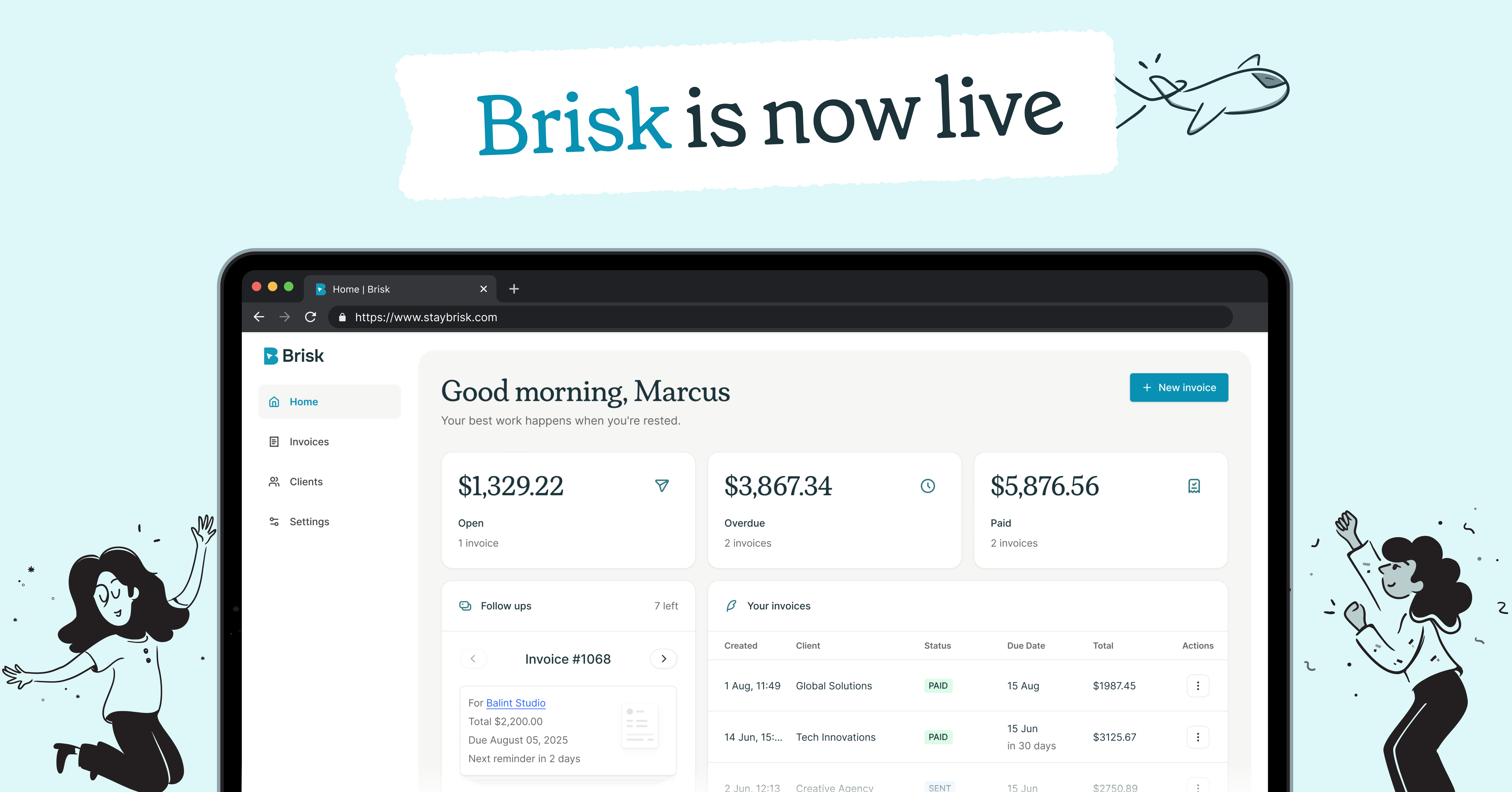
The velvet rope is finally coming down! After months of fine-tuning behind the scenes with our early beta users, we’re officially tossing the waitlist aside. Brisk is now open to every freelancer, side-hustler, and creative professional ready to simplify their workday.
We built Brisk because we know you’d rather spend your time creating than chasing paperwork. Now that we're live for everyone, here’s how we’re making your freelance life a whole lot easier:
-
Get paid in a flash: Create professional, branded invoices in seconds and send them off with a click. No more fiddling with spreadsheets or messy templates.
-
All your clients in one spot: Keep track of contact info, project history, and outstanding balances without digging through your inbox.
-
Simple, stress-free tracking: See exactly who owes you what and when it’s due, so you can stop worrying about finances and get back to the work you love.
Whether you're just starting your freelance journey or you're a seasoned pro, we can't wait to see how Brisk helps you grow your business. Thanks for being part of our journey - now go ahead and jump in!
Ready to get started? Create your free account today.
Brisk now works beautifully on your phone
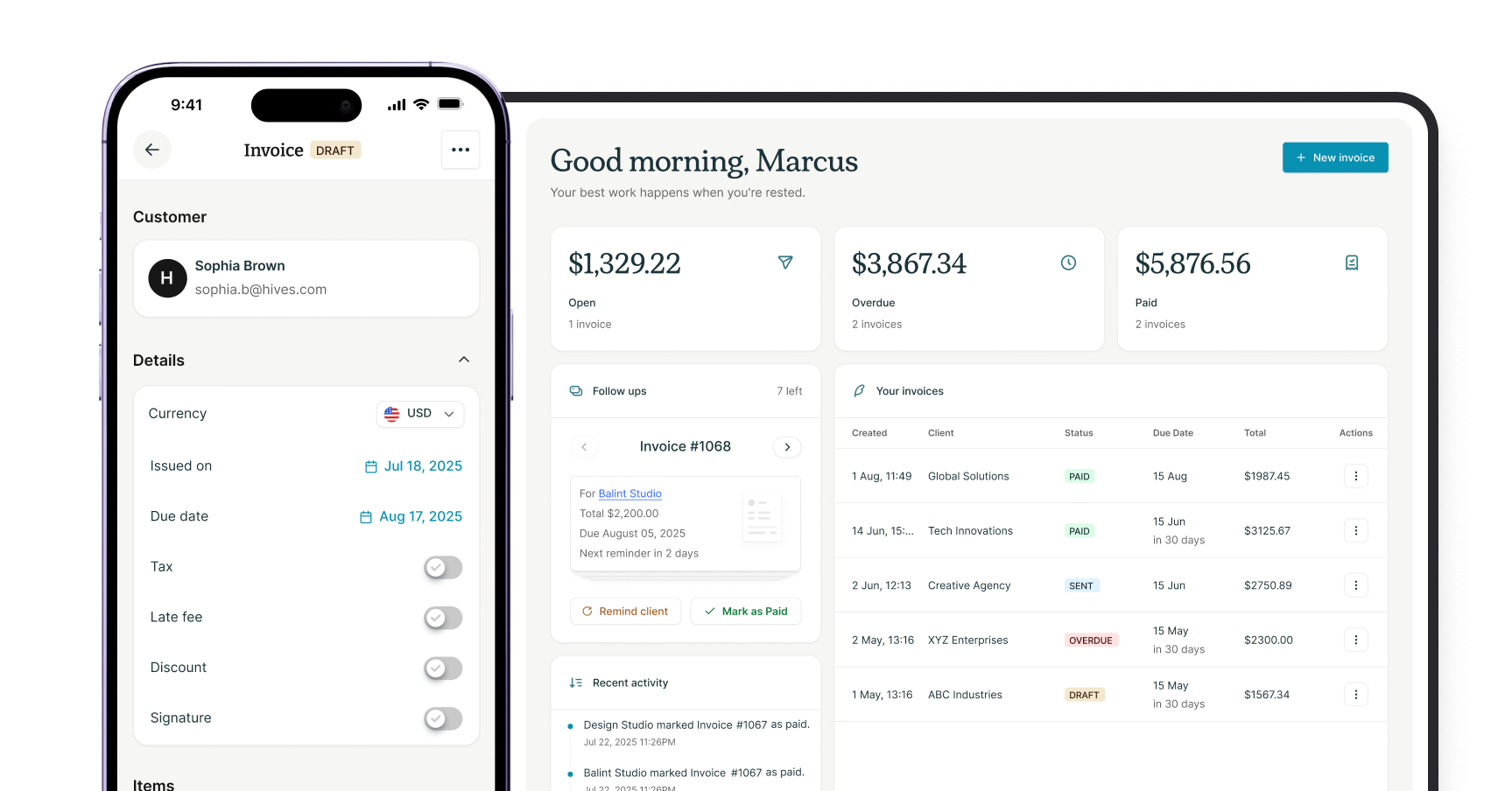
Working on the go just got a whole lot easier. You can now create invoices, check payment statuses, and manage clients directly from your phone or tablet.
We built this because freelancers don't always sit at a desk. Sometimes a client pays at 10pm and you want to check it from the couch, or you need to send a quick invoice between meetings. Now you can do that without opening your laptop.
What’s new:
-
Fully responsive layout: No more pinching and zooming through a desktop view on your phone.
-
Mobile invoice creation: Draft and send invoices in seconds from any device.
-
Live payment tracking: See exactly when you get paid, wherever you are.
Welcome to Brisk Updates
We're launching our public feedback board to hear directly from you.
Here's what you can do:
-
Share ideas: Tell us what features you want to see
-
Vote: Help us prioritize what matters most
-
Stay updated: Follow along as we ship improvements
Your feedback shapes what we build next. We're listening!